
Sometimes the problem is not the document itself. It is the size. A PDF that looks fine on your screen can suddenly be too large for Gmail, too slow to open on a phone, or too heavy for a school portal that has a strict upload cap. That is usually when people start searching for how to make a PDF smaller fast, preferably without signing up, paying a fee, or getting a watermark stamped across the file.
The good news is that reducing PDF size is usually simple. A well-compressed file is easier to send, easier to store, and less frustrating for the person on the other end. That matters whether you are sending a resume to a hiring manager, turning in a student assignment five minutes before the deadline, or sharing a project packet with coworkers during busy US evening internet hours.
At PDFSail, the goal is practical: help you get the file size down while keeping the process secure and quick. Files are handled on local servers with full 256-bit encryption protection, no file storage, and standards aligned with GDPR and nFADP compliance. That means you can move faster without wondering where your document ends up later. The platform has already helped over 100,000 users in American handle everyday PDF tasks more smoothly.
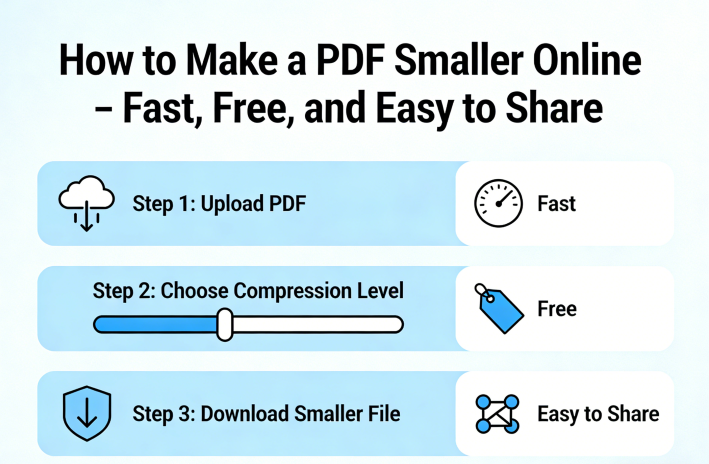
Step-by-Step: How to Make a PDF Smaller
-
Upload the PDF you want to shrink
Start with the file that is causing trouble, whether it is a scanned form, a resume, a research paper, or a brochure full of images. Go to the PDF Compression Tool and upload it. If your file is a mix of pages from different sources, you can organize them first with our PDF merge tool so you only compress the version you actually need.
-
Pick a compression level based on your real goal
This part matters more than people think. If your main issue is email sharing, you want a balanced result: smaller file, readable content. If you are archiving documents, storage efficiency may matter more. If people will open the file on phones or inside a browser, faster performance and loading times should be the priority. A smaller file is useful, but the best result is the one that solves the problem you actually have.
-
Run the compression and let the tool cut the extra weight
Once the file is uploaded, start compression. This step removes unnecessary heaviness from the PDF so the document becomes easier to share and quicker to handle. Large image-heavy PDFs usually benefit the most, especially files exported from slide decks or mobile scans. If you created the document from photos, our JPG to PDF tool can help you build a cleaner source file before compressing it again.
-
Check the result before sending or submitting
Open the smaller PDF and review it like the recipient will. Scroll through the pages. Make sure charts are visible, text is readable, and the formatting still looks right. This is especially important for student uploads, legal forms, and job applications where one blurry section can cause avoidable problems. If you spot a typo or need to tweak content, use the PDF editor and then save a final compressed version.
-
Download, share, or convert it for the next task
Now you have a file that is easier to email, store, and open. Download it and move on. If your next step is editing, you can send it through PDF to Word. If the document contains tables or reporting data, PDF to Excel conversion may save time too. Smaller files make every step after this easier.
Why making a PDF smaller helps more than you think
The first obvious benefit is sharing. A smaller PDF is less likely to bounce back from email limits or freeze during uploads. That sounds minor until you are sending a contract to a client, submitting a college application, or uploading supporting documents to an employee portal. Enhanced sharing and accessibility are not just nice extras. They are often the difference between getting the file through and having to start over.
Storage efficiency is the second big reason. If you keep years of invoices, scanned receipts, onboarding files, or coursework, file size adds up fast. Trimming each PDF even a little can make folders easier to manage, backups lighter, and long-term storage less messy. People usually notice this after a few months, when their desktop or shared drive is full of documents that could have been much smaller from the start.
Then there is speed. Faster performance and loading times help on older laptops, crowded Wi-Fi, and mobile devices. A lighter PDF opens quicker in the browser, downloads faster, and creates fewer headaches when someone needs it right away. For teams and students especially, that makes daily tasks feel less clunky. You are not waiting around for one oversized attachment to cooperate.
There is also the security side, which gets ignored until the file contains something sensitive. When you compress documents online, you want to know they are protected in transit and not sitting on a server afterward. PDFSail uses local servers, full 256-bit encryption protection, and no file storage. That setup is built for people who need fast results without trading away privacy.
Frequently Asked Questions
A smaller PDF should take seconds, not your whole afternoon
If your file is slowing down sharing, eating up storage, or taking forever to open, there is no reason to keep fighting with it. PDFSail gives you a free way to make PDFs smaller on local servers with no file storage, full 256-bit encryption protection, and a workflow built for real tasks people have every day. Quick upload. Quick compression. Done.
Discover How to Make Your Files Smaller in Just Seconds!